Visit the Official Site - Prostockmaster.com

Prostockmaster is a free upload software tool to streamline the process of uploading images to microstock sites. It currently supports several microstock agencies including:
 

Review

The software is free for up to 5 uploads per day (so fine if you just starting out, especially with limits the istockphoto place on starter accounts). It allows the automatic upload of entire folders of images to multiple agencies with a single click. The limit of 5 applies to image batches not individual uploads so you can upload 5 images to multiple websites so long as you upload to the sites in one batch. e.g. upload one image to istockphoto and bigstockphoto, then a different image to 123rf and fotolia then that would count as 2 uploads in your limit of 5, if you then uploaded the first image to 123rf and fotolia that would count as three uploads.

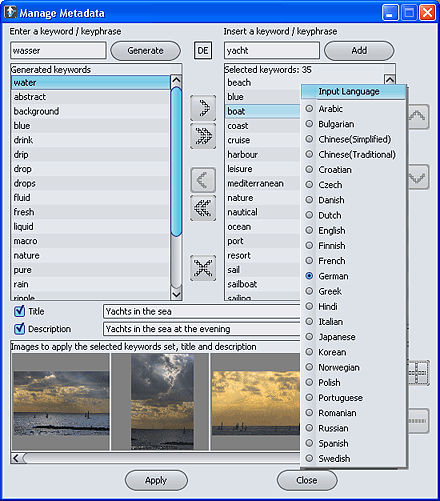
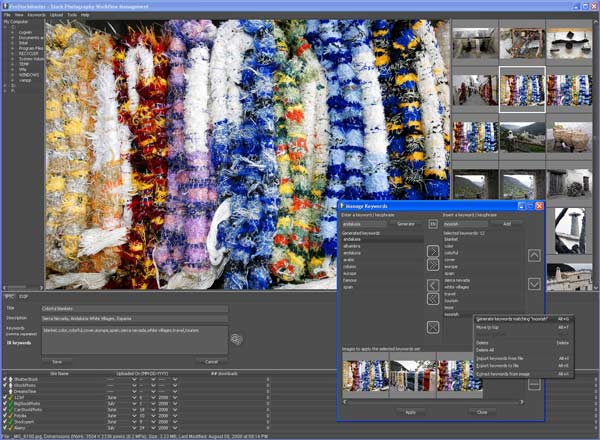
There is a built in keyword, title and description editor to modify the IPTC / EXIF details ready for upload so that you don't have to add keywords etc manually to each image. There is also a keyword suggestion tool (generate) which automatically suggests related keywords for an image once you have entered one or two keywords yourself (this is good for suggesting keywords you might have overlooked or not thought of, but you do have to go through and remove the irrelevant keywords it suggests. If you only need some free software to keyword and title your images then there is no need to buy the full commercial version of prostockmaster.

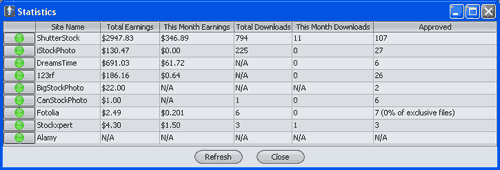
Statistics and search functionality is built in so you can check how each image is selling on all the sites you submit to in one place, and search though images you have catalogued previously.
It also features some great workflow improvement tools like copying keywords between images and some promotional features allowing to to share images on sites like myspace.

If you are familiar with FTP, and already use another piece of software to keyword and title your images then another option you might consider is just FTPing you files to each of the sites.


Conclusion

prostockmaster is not without issues, it is very basic in it's functionality, see below. It can feel a little clunky and slow perhaps owing to the JAVA language it is written in, it takes a little bit of getting used to and a little experimentation to fit it into your photo upload workflow (but I guess that would be the same of any new software). A new version is to be released addressing some of these issues. Problems aside I do use it to batch upload images to each of the microstock sites and it is a useful application, i'm looking forward to the next version being released so that i can stop having to 'work around' some of the limitations like resubmitting images etc.

beginners guides Tip:
One gotcha that the software has at the present time is that there are no messages to warn you that you have entered your password or user name incorrectly, it just blindly 'appears' to be uploading even if the upload failed (in fact it still claims to be uploading successfully to lucky oliver even now that the site has shutdown!). One thing you should do is confirm that the 'statistics' window correctly updates, if any of the sites display nothing or 'null', then there is a problem, either with that site of the username and password you entered. Secondly, from the problems I had it seems that you MUST activate ftp uploads on several of the microstock sites in order for this to software work (many sites do not have ftp upload switched on by default, some sites have a link with 'apply for ftp access' which is activated instantly).

Download Prostockmaster (via prostockmaster.com)


Alternatives:

Photo Keyword embedding software

FTP image upload to microstock sites
 

Related Posts:

Overview of different methods to upload images for sale


Anonymous's picture

Prostockmaster

DreamPhoto (not verified) on Tue, 05/20/2008 - 09:29
I think you are being kind about the interface, to be blunt its horrible. but it does work like you say. I also had problems with 2 of the sites until i realised that I make a mistake with the user name on one and I guess my password on the other. now it's all sweet. there is no way I would use it to organise my images! i use use it as an upload tool and sanity check on the keywords I have ready edited with photoshop, i just copy the images to a new directory and use prostock to upload from there.
Anonymous's picture

Cushy Stock

Paula Cobleigh (not verified) on Thu, 01/22/2009 - 22:38
I see you have ProStockMaster listed, but not Cushy Stock. I would like to have you review this software or give you input about it. I actually purchased it and like it so far, but I'm kind of new to the microstock world and don't have enough experience to be an expert on the topic.
Steve Gibson's picture

Cushy Stock Review

Steve Gibson on Fri, 01/23/2009 - 03:19
I have been planning  a cushy stock review for some time. I know a lot of photographers rate it over prostockmaster and indeed a plan to switch to it myself at some point soon (at which point there will be a full review). I can see it has several significant advantages over prostockmaster. thanks for your feedback, steve
Anonymous's picture

Prostockmaster and Cushy

stuart atton (not verified) on Fri, 05/22/2009 - 22:35
Having downloaded Prostockmaster and started setup, it tells me I can only upload 5 images per day ! That could be limiting !! I also looked at Cushy Stock, what a horribly messy interface ! The mention of Russian and Ukrainian language options didn't instill me with confidence either ! ;-) Stu
Steve Gibson's picture

Did you read the review?

Steve Gibson on Sat, 05/23/2009 - 00:14

Start of Paragraph 2 "The software is free for up to 5 uploads per day (so fine if you just starting out...."

I actually think it's quite a liberal offering for a demo version - the full version if $49 dollars which is the same cost as the pro version of the FTP software I use to do multi-uploads (to pretty much the same effect as prostockmaster and cushy but without the stats and iptc editing)

I've been trying to do a cushy review for a while, but not getting much of a response from their site - if they don't bother replying to me then I'm not going to do much about reviewing the software - it looks a little better than PSM in that you can add ftp sites manually (I think)

I don't really like either of them, but they do offer some great advantages to many microstock contributors. They both have user interfaces that seem to have been developed by someone tripping on acid - making them hard to use efficiently to say the least BUT, they are better than uploading on the web.

If there was a security problem with either then we would have heard about it by now - it is a big issue tho, all your password credentials to all/many microstock sites in one place.

Anonymous's picture

Got it ! missed that bit

Stu (not verified) on Fri, 05/29/2009 - 09:13
Got it ! missed that bit about 5 uploads NOT 5 files first time round, trying to take in so much info at the moment as a newbie :-) Was about to buy but no need now, for the moment. I rather like PSM, not exactly polished but very useable (ver. 1.6.3). Stu
Anonymous's picture

I am currently trying this

Waz (not verified) on Sat, 08/15/2009 - 14:22
I am currently trying this product out... in it's present form I wouldn't pay for it. It's too slow (keywording takes ages to suggest) and now with version 1.6.4 they've now restricted keyword to 5 images in a 4 hour period! So now I'm defintely not going to use it!
Steve Gibson's picture

Free Version

Steve Gibson on Sat, 08/15/2009 - 21:44
Only the free version has those limitations, but these days I would tend to point people at isyndica if they wanted something to submit to multiple agencies
Anonymous's picture

Wow thanks for this amazing

TimM (not verified) on Thu, 10/29/2009 - 19:42
Wow thanks for this amazing software. I was searching for some application which would help me to make the photo uploading process automatic. It will definitely be useful for my job. Thanks one more time and I will be waiting for other great articles and tips from you. Sincerely, Tim Morton from telecom software development 

Add new comment

Popular content